
Why Do Different QR Code Generators Create Different QR Codes?
Take a look at these two QR codes.
.png)
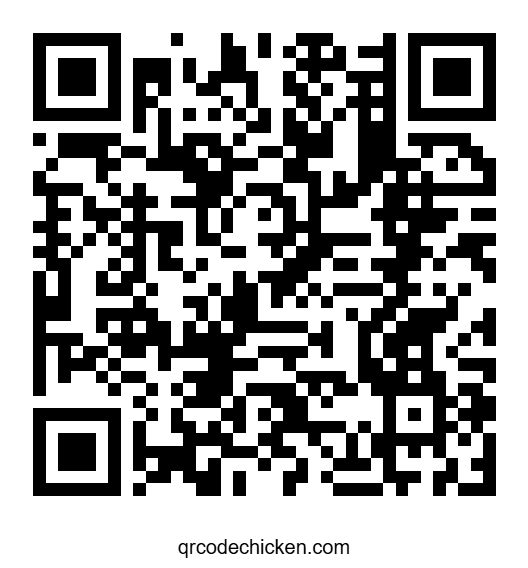
At first glance, they don't look the same at all.
One has larger squares and a simpler pattern, while the other looks much denser and even has the text "qrcodechicken.com" printed underneath.
If you've ever generated the same QR code using two different websites, you've probably noticed something similar.
Can you guess where each QR code takes you?
Surprisingly, the answer is the exact same URL.
https://www.youtube.com/watch?v=dQw4w9WgXcQ&list=RDdQw4w9WgXcQ&start_radio=1
If you scan either one, you'll end up at the exact same website.
So why do they look completely different?
Shouldn't there be only one correct QR code for a given URL?
The answer is no.
Unlike many people expect, a QR code doesn't have a single fixed appearance. The QR Code standard gives generators several choices when creating a QR code, and those choices can change the final pattern without changing the data stored inside it.
Think of it like writing the same sentence using different fonts.
The words stay exactly the same, but the way they look on the page changes.
QR codes work in a very similar way.
As long as a QR code follows the QR Code standard, any compliant scanner will decode it correctly—even if another QR code containing the same data looks completely different.
In the rest of this guide, we'll look at the main reasons this happens, starting with the one that has the biggest impact on a QR code's appearance: error correction.
1. Different Error Correction Levels
The biggest reason two QR codes can look different is that they use different error correction levels.
Error correction is one of the features that makes QR codes so reliable. Instead of storing only your data, a QR code also stores additional recovery information that can help scanners read the code even if part of it is damaged.
For example, if a QR code becomes scratched, dirty, partially covered by a sticker, or has a logo placed in the center, a scanner can often still recover the missing information using this extra data.
You can think of it like making a backup copy of important information. If a small part of the original is lost, the backup helps fill in the missing pieces.
The QR Code standard defines four different levels of error correction. Each level stores a different amount of recovery data.
| Error Correction Level | Approximate Recovery |
|---|---|
| L | Up to 7% |
| M | Up to 15% |
| Q | Up to 25% |
| H | Up to 30% |
The higher the error correction level, the more recovery information the QR code needs to store.
Since that extra information takes up space, the QR code often needs more black and white modules (the small squares) to hold everything. As a result, the pattern becomes denser and can look completely different from another QR code that stores the same data using a lower error correction level.
For example, one QR code generator might choose Level L to create a smaller and simpler QR code, while another might choose Level H to make the QR code more resistant to damage or leave room for a logo.
Even though the two QR codes look different, they still contain exactly the same destination. They simply make different trade-offs between size and durability.
2. Different QR Code Versions
Another reason two QR codes can look different is that they may use different QR code versions.
Despite the name, a QR code version isn't a software version or a newer generation of QR codes. Instead, it simply refers to the size of the QR code's grid.
The smallest QR code is Version 1, which contains a grid of 21 × 21 modules (the small black and white squares).
Every time the version increases, the grid becomes larger by adding four more modules to both the width and height.
| QR Code Version | Grid Size |
|---|---|
| Version 1 | 21 × 21 |
| Version 2 | 25 × 25 |
| Version 3 | 29 × 29 |
| ... | ... |
| Version 40 | 177 × 177 |
Most everyday QR codes only need one of the smaller versions because they usually store a short website address or a small amount of text.
However, not every QR code generator chooses the same version.
One generator might automatically select the smallest version that can hold your data, creating a compact QR code with fewer modules.
Another generator may intentionally choose a larger version to leave extra room for design features such as a logo, improve printing quality, or keep every generated QR code the same size for visual consistency.
As a result, two QR codes containing the same URL can have different grid sizes and different-looking patterns, even though they both scan to exactly the same destination.
3. Different Mask Patterns
Even if two QR code generators use the same error correction level and the same QR code version, they can still produce QR codes that look different.
That's because every QR code goes through one final step before it's finished: choosing a mask pattern.
At first, the data is placed into the QR code according to the QR Code specification. However, this raw pattern isn't always ideal for scanning.
Sometimes it can create large blocks of black modules, long horizontal or vertical lines, or repeating patterns that make it harder for a scanner to distinguish the actual data from the QR code's positioning markers.
To solve this problem, the QR Code standard defines eight different mask patterns.
A Simple Example
Imagine the QR code generator starts with a raw pattern like this:
Before masking
After applying a mask pattern
Notice how the arrangement of the black and white modules changes. The encoded information is exactly the same—the only difference is how that information is visually distributed across the QR code.
This helps avoid large blocks, long lines, and repeating patterns, making the QR code easier for cameras to detect and scan reliably.
A mask pattern doesn't change the information stored inside the QR code. Instead, it changes which individual modules appear black or white, creating a pattern that is easier for cameras to read.
You can think of it like rearranging furniture in a room.
The room still contains the same furniture, but a different arrangement can make it much easier to move around.
QR code generators try each of the eight possible mask patterns and give each one a score based on rules defined in the QR Code specification.
The mask with the lowest penalty score is selected because it produces the most scanner-friendly QR code.
This means two different generators may choose different mask patterns, especially if more than one pattern receives a very similar score.
The result is two QR codes that look noticeably different but still contain exactly the same data and scan to the same destination.
4. Different Design Choices
Not every difference between two QR codes comes from the QR Code specification itself.
Many QR code generators also make different design decisions to improve appearance, branding, or usability.
For example, one generator might create a plain black-and-white QR code, while another automatically adds a label underneath, rounds the corners of the modules, increases the white border, or places a company logo in the center.
These design choices change how the QR code looks, but they usually don't change where it takes you.
Common design differences
- Different colors
- Rounded or square modules
- Rounded or customized corner markers
- Logos placed in the center
- Different quiet zone (white border) sizes
- Labels or text below the QR code
- Different output sizes and image resolutions
Looking back at the two QR codes at the beginning of this article, one of them includes the text "qrcodechicken.com" underneath, while the other doesn't.
This is a design choice made by the QR code generator. It doesn't affect the encoded URL or change where the QR code leads—it simply provides an additional visual cue for people scanning it.
As long as these design elements don't cover too much of the QR code or reduce the contrast too much, the QR code will usually remain just as scannable as a standard one.
5. Does One QR Code Scan Better Than Another?
After seeing how different two QR codes can look, you might be wondering whether one is actually better than the other.
The short answer is: not necessarily.
A QR code that looks denser, larger, or more complicated isn't automatically easier to scan. Likewise, a smaller and simpler-looking QR code isn't automatically worse.
What really matters is whether the QR code follows the QR Code specification and is produced with good scanning practices in mind.
A good QR code should:
- Encode the correct data.
- Use an appropriate error correction level.
- Include a sufficient quiet zone (white border).
- Maintain good contrast between dark and light modules.
- Be printed or displayed at an appropriate size.
If these requirements are met, two completely different-looking QR codes will usually scan just as reliably as one another.
In fact, many of the differences we've discussed throughout this article are simply different implementation choices made by the QR code generator. They don't mean that one QR code is "correct" and the other is "wrong."
The best QR code isn't the one that looks the nicest or contains the most modules—it's the one that can be scanned quickly and consistently by the devices your audience is using.
Conclusion
Let's go back to the two QR codes we looked at at the beginning of this article.
Even though they look completely different, they both encode the exact same URL and take you to the same destination.
That's because a QR code doesn't have a single fixed appearance. The QR Code specification gives generators several choices during the creation process, allowing multiple valid QR codes to represent the same data.
Throughout this guide, we've seen that differences in error correction levels, QR code versions, mask patterns, and design choices can all change how a QR code looks without changing the information stored inside it.
This is why it's completely normal for two QR code generators to produce different-looking QR codes for the same URL. As long as both follow the QR Code specification, they'll remain fully compatible with modern QR code scanners.
So the next time you generate the same QR code using two different websites, don't be surprised if the patterns don't match. A different appearance doesn't mean one QR code is wrong—it simply means the generator made different, yet perfectly valid, choices when creating it.
Key Takeaways
- Different-looking QR codes can contain exactly the same data.
- Error correction levels affect the size and density of a QR code.
- Different QR code versions use different grid sizes.
- Mask patterns rearrange modules to improve scan reliability.
- Design features like logos, colors, and labels change appearance but usually not functionality.
- A QR code's appearance is less important than whether it follows the QR Code specification and scans reliably.
Create Your Own QR Code
Now that you know why different QR code generators can produce different-looking QR codes for the same data, try creating one yourself. Generate QR codes for websites, Wi-Fi networks, contact cards, email addresses, cryptocurrency wallets, and more—all for free.
Generate a Free QR CodeSupport QRCodeChicken
QRCodeChicken is free to use and built independently. If the tool helped you, you can support future development through Ko-fi or Bitcoin.
☕ Support on Ko-fi
Fast and simple support through Ko-fi. Every donation helps keep QRCodeChicken free and improving.
₿ Bitcoin
Support the project directly with Bitcoin.
Wallet address
bc1qqyyr6qlywucvkm3cffpauw9tmregaafr7ahsw8ejhql2wga0nvtqvup9nq
Contact
Found a bug, have a suggestion, or need help using QRCodeChicken? Feel free to contact me directly.